If you own a Nissan LEAF 40 kWh built between 2018 and 2020, or an e-NV200 produced between 2018 and 2022, you may have already received an email you really didn’t want to see. Nissan has shut down the NissanConnect EV app for these vehicles, and with it, every remote feature you’ve relied on for years: remote charge start, remote climate control, battery status checks, charge timers, and vehicle locator functions. The car itself still drives just fine — but the “smart” part of your smart EV has effectively been switched off.
The good news is that you don’t have to accept this as the end of the road. A community-built, open-source project called OpenCARWINGS restores these exact features, often with improvements Nissan never offered. And if you’d rather not spend a weekend with a soldering iron and a multimeter, the Viaaq workshop has become the go-to place for owners who want their car back online without doing the technical work themselves.
Let’s break down what actually happened, why it matters, and what your options are.
What Nissan Actually Shut Down
NissanConnect EV (the successor to the original CARWINGS system) is the app and backend service that lets LEAF and e-NV200 owners interact with their car remotely. Through the app or a web portal, owners could:
- Check battery charge level and estimated driving range
- Start or stop charging remotely
- Set charge timers to take advantage of off-peak electricity rates
- Turn on climate control before getting in the car (handy in Finnish winters and everywhere else)
- Receive charge-complete and plug-in reminder notifications
- View the vehicle’s location and, on some models, lock/unlock or sound the horn remotely
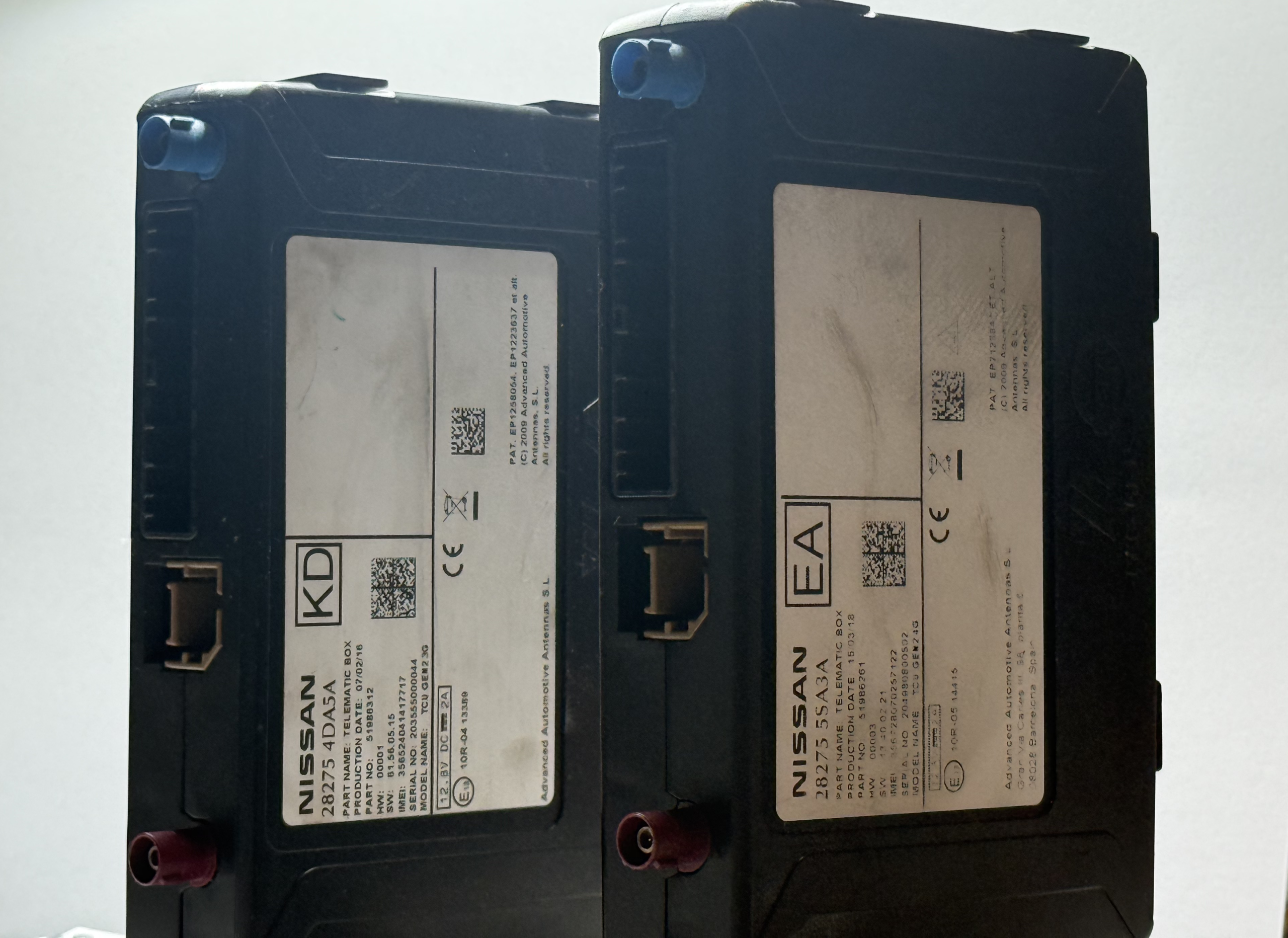
Nissan notified affected owners that these services would stop working, citing the underlying legacy telematics infrastructure — the original telematics control units (TCUs) in these cars rely on older cellular networks and backend systems that Nissan no longer wants to maintain. Newer LEAF models and the Ariya have moved to the MyNISSAN app instead, but that doesn’t help anyone driving an earlier 40 kWh LEAF or e-NV200. For cars that are, in many cases, still well within their useful life, this amounts to a manufacturer switching off a core feature owners paid for.
Unsurprisingly, this has left a lot of owners frustrated — especially those who bought their LEAF specifically because it offered these convenience and cost-saving features.
Enter OpenCARWINGS: A Community-Built Replacement
Rather than let a perfectly good telematics unit go to waste, developer on Github (developerfromjokela) built OpenCARWINGS — an open-source server that is compatible with the original CARWINGS/NissanConnect protocol. In plain terms, it’s a replacement backend that talks to your car’s existing TCU using the same “language” Nissan’s own servers used, just hosted independently and kept alive for the long term.
OpenCARWINGS currently supports:
- Remote control of air conditioning
- Remote control of charging, including scheduled timers
- Push notifications for charge status and plug-in reminders
- Reading and writing TCU configuration
- Bringing CARWINGS functionality back to the in-car navigation head unit
- Trip journey and efficiency tracking (currently in beta)
It’s fully open source, with the code published on GitHub, and there’s an official hosted instance as well as the option to self-host your own server if you’re technically inclined. There’s also a companion mobile app and even a Home Assistant add-on for owners who want their LEAF’s charging status integrated into their smart home dashboard.
The catch — and it’s a real one — is that OpenCARWINGS isn’t a plug-and-play app you simply download. Because Nissan’s original mobile network subscription for the TCU has been discontinued, getting the car “seeing” the new server requires swapping in a new SIM card, reconfiguring the TCU’s connection settings over OBD, and in many cases physically opening up the TCU to solder in a SIM card slot. It’s absolutely achievable for a confident DIYer, and the community has produced detailed guides for it, but it’s not for everyone.
Why Bother — Can’t You Just Live Without the App?
Technically, yes. Your LEAF or e-NV200 will keep driving, charging, and holding a charge exactly as before. But for many owners, remote charge scheduling isn’t a nice-to-have — it’s how they avoid charging during peak electricity hours, and how they make sure the car is warm (or cool) and ready to go on a cold morning without pre-heating manually from the driver’s seat. Losing that functionality is a genuine downgrade in day-to-day usability, not just a cosmetic app feature.
There’s also the practical matter of resale value. A LEAF with working remote features is simply a more attractive used EV than one where the “smart” functionality has been permanently disabled by the manufacturer.
The Easier Route: Let the Viaaq Workshop Handle It
If the idea of soldering a SIM slot onto your TCU’s circuit board, flashing new firmware, and manually editing connection profiles sounds like more than you signed up for, you’re not alone. This is exactly the gap the Viaaq workshop fills.
Viaaq is the team behind the official OpenCARWINGS hosting infrastructure, and their workshop has become the go-to option for LEAF and e-NV200 owners who want their car’s remote features restored without doing the hardware modification themselves. Instead of ordering parts, disassembling interior trim, and hoping you’ve followed a forum guide correctly, owners can have the TCU conversion and setup handled by people who do this repeatedly and know the quirks of each generation of car — ZE0, AZE0, and ZE1 all have slightly different TCU hardware and installation procedures.
Going through a workshop like Viaaq typically means:
- No risk of damaging your TCU or navigation unit during a DIY install
- Correct SIM provisioning and APN configuration done right the first time
- Your OpenCARWINGS account set up and linked to your vehicle properly
- Peace of mind that the CARWINGS-compatible server your car is now talking to is actively maintained
For owners who just want their remote charging and climate control back — without becoming an amateur telematics engineer in the process — this is the most practical path forward.
The Bottom Line
Nissan’s decision to shut down NissanConnect EV for 2018–2020 LEAF 40 kWh and 2018–2022 e-NV200 models is a frustrating reminder of how much of a modern car’s usefulness depends on a manufacturer’s willingness to keep the lights on in the cloud. Thankfully, the EV community didn’t just accept the outage. OpenCARWINGS proves that the underlying hardware in these cars is more than capable of staying connected for years to come — it just needs someone to keep the server running.
Whether you want to tackle the TCU modification yourself using the community’s open-source guides, or you’d rather hand the whole process to specialists, the path to getting your car “smart” again is open. For most owners, working with the Viaaq workshop is the simplest, safest way to get back the remote charging, climate control, and notifications that made owning a LEAF or e-NV200 convenient in the first place.
Have you already made the switch to OpenCARWINGS? Share your experience in the comments below.